





HyperCam es una utilidad muy práctica para profesores o usuarios que se dedican a elaborar manuales de ayuda sobre determinados programas ya que con esta aplicación podrás capturar toda la actividad de la pantalla.
Si tienes que enseñar como se hace una determinada tarea en un programa paso a paso, esta aplicación te resultará bastante útil ya que desde que empieces a grabar se capturará todo guardándose en formato AVI.
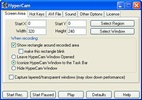
No sólo permite capturar la pantalla entera sino que por el contrario podrás en todo momento elegir cualquier fragmento determinando que zona quieres grabar.
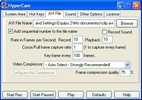
HyperCam incluye bastantes opciones de configuración, incluso ofrece la posibilidad de elegir un códec para el archivo final AVI dependiendo del destino final del mismo.
También podrás añadir un número a cada grabación, modificar la calidad de sonido, establecer atajos de teclado para el uso del programa, etc.


 11 valoraciones

















Comentarios
¿Podría HyperCam capturar video (avi) de una sola ventana activa solamente? Si no es así, sugiérame cualquier software de captura de video en pantalla que pueda hacerlo. Saludos, Ray
La verdad es q es buen programa.. pero le faltaria el sonido y estamos completos!
Es bueno este programa...y para ponerle música a los vídeos que grabais con la hypercam,se tiene que descargar otro programa...si puedo,os digo cual es.
no conosco uno ke grave sonido pero el Pinnacle VideoSpin te deja poner el video y ponerle cualkier musika ke kieras
Saben de alguno que si grave el sonido
Alex tiene razon, pude aprender a gravar fue muy facil.. pero despues de unos dias me aparesio algo de error, y no podia gravarv mas... antes de eso me sirvio de mucho porq pude subir videos a youtube...